



What is image watermark
Batch watermark software
Create a watermark to your photo
Protect photos copyright
Select watermark software
How to watermark
Check latest version
Support formats
Watermarked image
What is original image
What is watermark
Overview
Getting Started
Details of Aoao Photo Watermark
Key Feature
Technical Support
Watermark Glossary
Sample
Screenshot
Choose photo watermark software
How to make a watermark
How to remove watermark
Remove watermark with cover new
Add text watermark to photos
Add image watermark to photos
Add photo watermark to images
Batch watermark your photos
How to add frames to photos
How to crop pictures
How to resize pictures
How to batch rename files
Create a watermark template
Load the watermark template
Add multi-watermarks to photos
How to convert image format
How to convert image to JPEG
How to convert image to GIF
Get Aoao Watermark
Add text to a picture
Create watermark
Image watermark
Photo frame
Watermark images
Watermark photos
Add copyright to photo
Add watermark to picture
How to copyright photos
Text watermark


Get latest version of Aoao Watermark.
Aoao Watermark getting started
View Detail of Aoao Watermark
In the internet, we can get anything easily, such as tutorial, video, music, picture, etc. And we can get picture easier than others, because video, music need downloading, but we can get picture by press print screen key. That means photo is unsafe on the internet, anybody able to download and modify your online picture without you agree. That’s so terrible.
So we need protect our picture before upload to any websites, the simple and effective way is put text on picture. Because when we added text to picture after, every visitor will see the text, they are will to know the picture is yours, and nobody able to remove the text from your picture. The text like watermark embed to your pictures, just you hold the original picture, put text on picture will you avert unauthorized using.
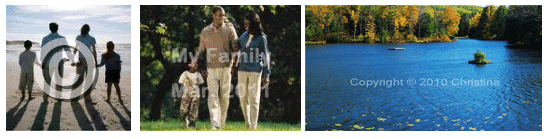
If you want to put text on picture also, you need watermark software first. Here I will tell you how to choose right photo watermark software.
1. The basic function – put text on picture
As we want, put text on picture like a watermark is necessary, and we would like to put image, watermark on picture also, it must have those functions.
2. Support all popular picture formats
Common picture format are: JPG, GIF, BMP, TGA, PNG, TIF, etc, one less.
3. Fast speed and good quality
I think nobody would like to get low-quality picture, so the software must keep the output pictures as same as original pictures; and, no one like waiting long time for anything, so batch watermarking mode is necessary.
4. Easy to use
We are not professional picture editor and we do not like learn a software long time. So easy to use is we want.
5. Useful picture functions
We also need some useful picture editing functions like picture resize, crop picture, etc.
6. Cheap Price
Good stuff is not cheap, but, anything is possible.
Aoao Watermark Software is easy-to-use photo watermark software, provide professional image protection solutions for your pictures. Allow your put watermark, logo, image and text to your pictures in batch mode. Protect theirs safety of copyright, avoid from unauthorized use.
Click below button to FREE TRIAL Aoao Watermark (without functions limit).

1. Launch, load pictures from your disc and then click 'NEXT>>' button.
Tips: if you want to add text to pictures, just load more pictures.
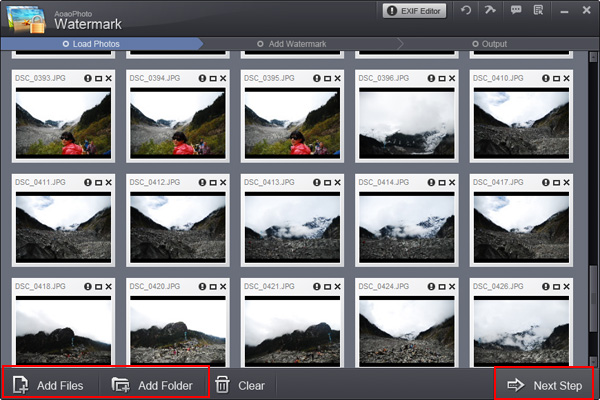
2. The software have six main functions, here we just use 'Add Text'.
2-1 in 'Add Text interface', the first thing is input any text or word which you want;
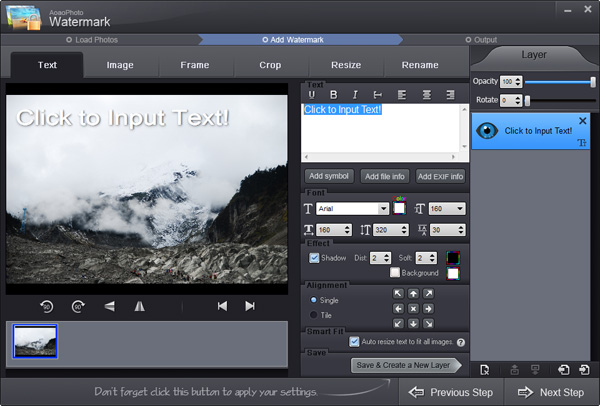
2-2 sets font, size, shadow, etc. You can also insert copyright symbols such © ® ™ here.
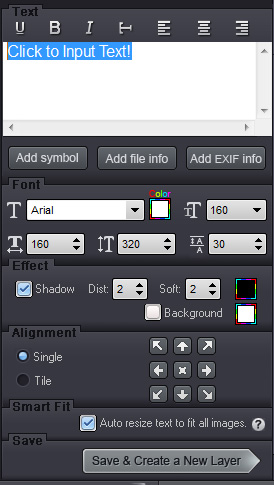
2-3 sets opacity, rotate, alignment here.
Tips: If you want to add text to pictures with batch mode, please activate box of 'Auto resize text to adapt each image'; if not, please cancel disable the box.
2-4 after finished all of settings, click 'Ok' button to apply settings and create a new layer.
Tip: all of functions must base on layer, so you need create the layer.
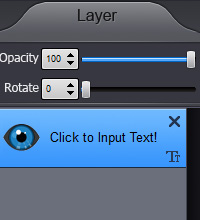
2-5 click 'Run' to open output interface.
3 Output setting.
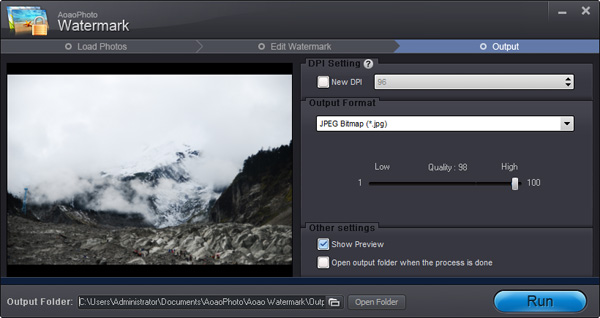
3-1 select output folder, you can also keep original folder.
Tips: after process done, the software will ask you 'Open output folder', so do not worry lose your output pictures.
3-2 select a image format for output, and then set the output quality.
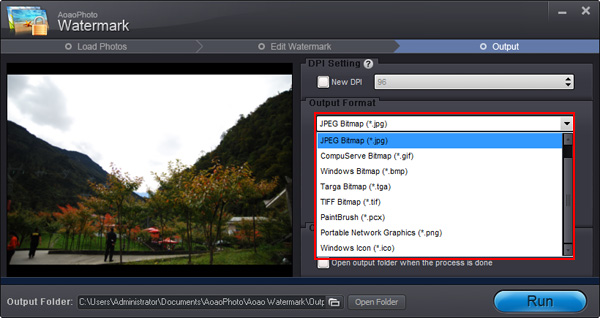
3-3 click 'Run' button to start output process.
Tips: the process of add text to pictures very fast, one picture less than 1 second.
The Limitation of Free Trial
1. The unregistered version of Aoao Watermark will put "DEMO" watermark on output photos.
2. No expiration.
3. No functional limitation.
Contact Us | License | Privacy | Sitemap
Copyright © 2009-2024 AoaoPhoto Digital Studio. All rights reserved.