

Photoshop Alternative
Add text or signatre to picture
How to Put Text to GIF
Put Text on Photos
Add Words to Animated GIFs
How to Add Text to Video
How to Add Words to Image
How to Batch Resize Photo
How to Add Logo to Video in Batch
How to Add Image to GIF
Choose photo watermark software
How to make a watermark
How to remove watermark
Remove watermark with cover new
Add text watermark to photos
Add photo watermark to images
Batch watermark your photos
How to add frames to photos
How to crop pictures
How to resize pictures
How to batch rename files
Create a watermark template
Load the watermark template
Add multi-watermarks to photos
How to convert image format
How to convert image to JPEG
How to convert image to GIF
Get Aoao Watermark
Overview
Getting Started
Details of Aoao Photo Watermark
Key Feature
Technical Support
Watermark Glossary
Sample
Screenshot


Get latest version of Aoao Watermark.
Aoao Watermark getting started
View Detail of Aoao Watermark
Do you want to add image watermark to your digital photos in order to protect photos’ copyright? If your answer is yes, you might be interested in this guide, which will walk you through how to watermark photos quickly and easily with the best image watermarking software. All of your great photos will be branded with your signature effortlessly.
Image watermark is really a special mark image that could be embedded into digital photos. This mark image could be designed at the will to make your images or photos unique. You will find some types of mark image for example transparent, company logo design, personal features.
The copyright information applied on your photo will display the original author of these images no matter who shared it and then your photos will be protected from unauthorized using. Now, more and more people use image watermark to protect their photos, how about you?
If you are professional photographer or graphic designer and have a professional photo editing program, you can create image watermark very easily and quickly. But most people do not know how to handle that professional photo software, so a good watermark program is necessary to help people watermark photos with simple steps.
Google Image Watermark Software, you will find a lot of watermarking programs. Among them, Aoao Watermark software is the best one when it comes to rich features and intuitive interface. It is a straightforward program which allows user to easily apply watermarks (text, image, logo and more) to your images within a user-friendly environment. Download a free trial to get started now!

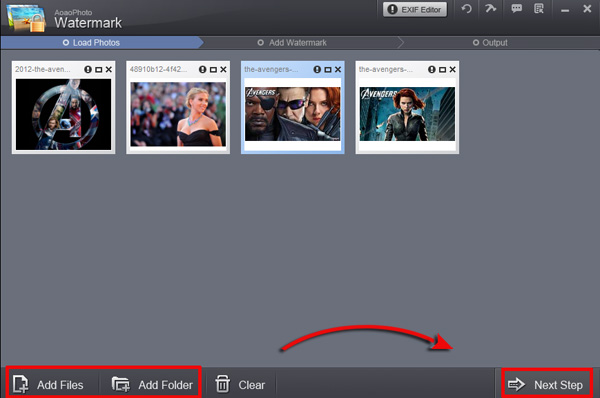
Click to download Aoao Watermark Software, and then launch it. Choose the image you want to add watermark, click "Next" to go to editing interface.
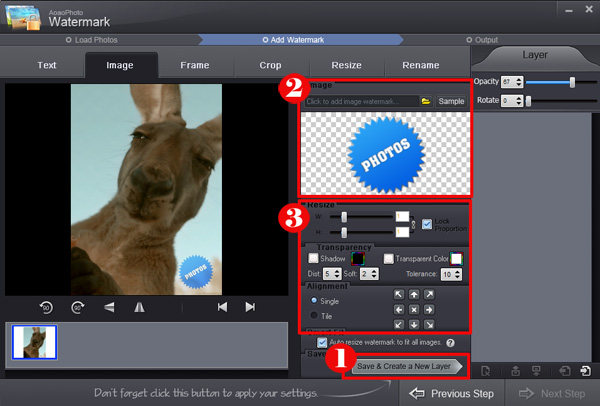
① Select an existing image watermark or click "Browse" to load a new image watermark from your disk.
② Then you can inverse proportion setting, you can set watermark width, high with separate or lock.
③ Adjust value of “Opacity” and “Rotate”. Adjust “Alignment” - position of watermark over the photo. You can also drag text watermark in preview window to change its position.
Specify “Single/Title”. Click “Apply” to apply what you made and you can go to step 3.
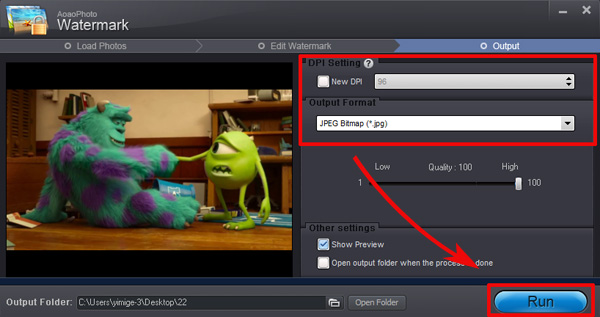
Hit “Next” button, you will come to export interface.
Specify output folder and output format.
Click “Run” to start processing watermark.
If you want to add image watermark to your photos, click here to learn more>>

The Limitation of Free Trial
1. The unregistered version of Aoao Watermark will put "DEMO" watermark on output photos.
2. No expiration.
3. No functional limitation.
Contact Us | License | Privacy | Sitemap
Copyright © 2009-2024 AoaoPhoto Digital Studio. All rights reserved.