
Photoshop Alternative
Add text or signatre to picture
How to Put Text to GIF
Put Text on Photos
Add Words to Animated GIFs
How to Add Text to Video
How to Add Words to Image
How to Batch Resize Photo
How to Add Logo to Video in Batch
How to Add Image to GIF
Choose photo watermark software
How to make a watermark
How to remove watermark
Remove watermark with cover new
Add text watermark to photos
Add image watermark to photos
Add photo watermark to images
Batch watermark your photos
How to add frames to photos
How to crop pictures
How to resize pictures
How to batch rename files
Create a watermark template
Load the watermark template
Add multi-watermarks to photos
How to convert image format
How to convert image to GIF
Get Aoao Watermark
Overview
Getting Started
Details of Aoao Photo Watermark
Key Feature
Technical Support
Watermark Glossary
Sample
Screenshot

Get latest version of Aoao Watermark.
Aoao Watermark getting started
View Detail of Aoao Watermark
In create a website, the trick is to use the right size- not too big and not too small. This should be so to enable the graphics to load more quickly, when users open the web page. Wouldn’t it be nice to see both the contents and the graphics of a website in just one click rather than wait for seconds or even minutes to view the photos?
Now, JPEG is the most popular image formats, because it have some advantages.
1. JPEG is its ability to store full color information approximately 24 bits per pixel or around 16 million colors.
2. In same size and quality, JPEG bytes smaller than other image foemats.
Step1: Add images
Launch , choose some pictures which you want to convert image to JPEG and click "Next".
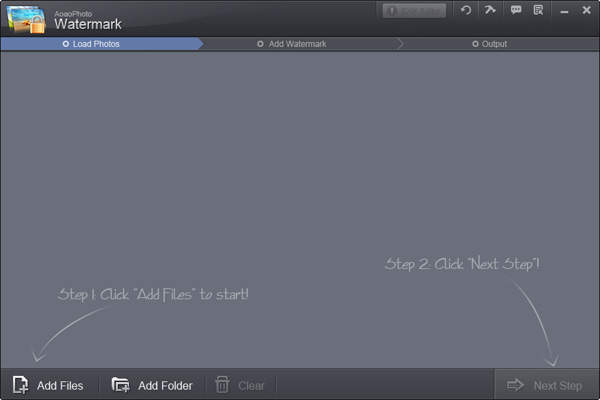
"Add Files" supports these image formats for output.
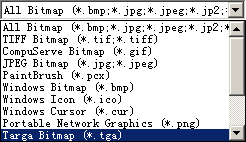
Step2: Choose JPEG Bitmap (*.tga) format for save.
If you wan to batch convert image to JPEG, please free trial below.
The Limitation of Free Trial
1. The unregistered version of Aoao Watermark will put "DEMO" watermark on output photos.
2. No expiration.
3. No functional limitation.
Contact Us | License | Privacy | Sitemap
Copyright © 2009-2024 AoaoPhoto Digital Studio. All rights reserved.