
Photoshop Alternative
Add text or signatre to picture
How to Put Text to GIF
Put Text on Photos
Add Words to Animated GIFs
How to Add Text to Video
How to Add Words to Image
How to Batch Resize Photo
How to Add Logo to Video in Batch
How to Add Image to GIF
Choose photo watermark software
How to make a watermark
How to remove watermark
Remove watermark with cover new
Add text watermark to photos
Add image watermark to photos
Add photo watermark to images
Batch watermark your photos
How to add frames to photos
How to crop pictures
How to resize pictures
How to batch rename files
Create a watermark template
Load the watermark template
How to convert image format
How to convert image to JPEG
How to convert image to GIF
Get Aoao Watermark
Overview
Getting Started
Details of Aoao Photo Watermark
Key Feature
Technical Support
Watermark Glossary
Sample
Screenshot


Get latest version of Aoao Watermark.
Aoao Watermark getting started
View Detail of Aoao Watermark
Sometimes, add multi-watermarks in once can save your lot time, if you want to sharing your photos to Web, Blog, Myspace, you need watermarking your photos, and add multi-watermarks in once is a great way.
Please click the button to download Aoao Watermark.

Step1: Add images to software.
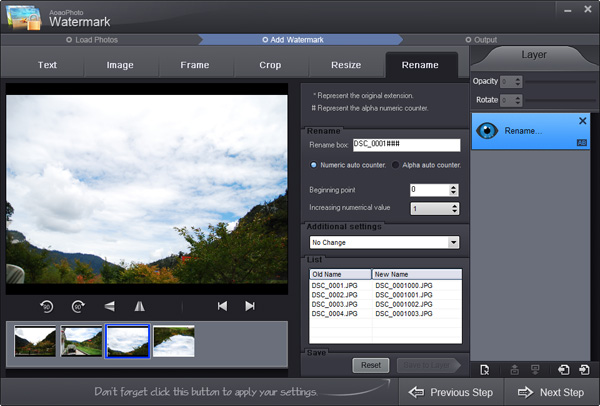
Step2: Create your first watermark.
Click "Ok" button to apply setting.
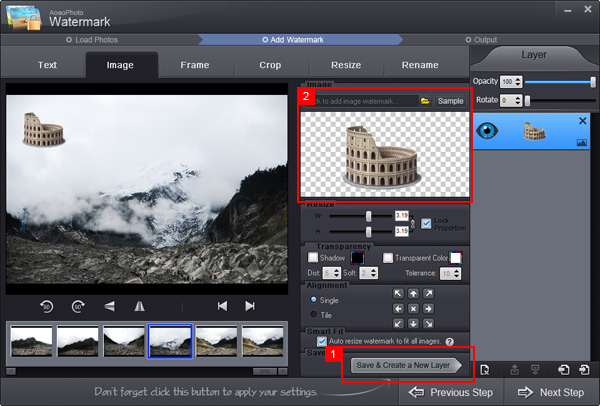
Step3: add multi-watermarks to digital photos.
1) Add multi-text watermarks.
Click the button to add a new text watermark layer, you can edit this text watermark.
2) Add multi-image watermarks.
Click the button to add a new image watermark layer, you can edit this image watermark.
Step4: Click "RUN" button to apply your all of watermark setting to photos.
If you want to add multi-watermarks in once, please click the button to download Aoao Watermark.
The Limitation of Free Trial
1. The unregistered version of Aoao Watermark will put "DEMO" watermark on output photos.
2. No expiration.
3. No functional limitation.
Contact Us | License | Privacy | Sitemap
Copyright © 2009-2024 AoaoPhoto Digital Studio. All rights reserved.