
Photoshop Alternative
Add text or signatre to picture
How to Put Text to GIF
Put Text on Photos
Add Words to Animated GIFs
How to Add Text to Video
How to Add Words to Image
How to Batch Resize Photo
How to Add Logo to Video in Batch
How to Add Image to GIF
Choose photo watermark software
How to make a watermark
How to remove watermark
Remove watermark with cover new
Add text watermark to photos
Add image watermark to photos
Batch watermark your photos
How to add frames to photos
How to crop pictures
How to resize pictures
How to batch rename files
Create a watermark template
Load the watermark template
Add multi-watermarks to photos
How to convert image format
How to convert image to JPEG
How to convert image to GIF
Get Aoao Watermark
Overview
Getting Started
Details of Aoao Photo Watermark
Key Feature
Technical Support
Watermark Glossary
Sample
Screenshot


Get latest version of Aoao Watermark.
Aoao Watermark getting started
View Detail of Aoao Watermark
Photo watermark is really a special text/image/logo design embedded into digital photos to represent copyright info/information to those photos. You will find several types of photo watermarks for example visual watermark, transparent watermark, company logo design and private signature, etc. Many photo editing tools will help design photo watermarks and retouch them at the will, say Photoshop and Paint.Net. However most of them are a bit complicated for common users. So today we will introduce you guys a very handy and straightforward watermarking tool – Aoao Watermark, which provides professional photo protection solutions for digital photos and relatively effective way to declare the ownership of photos.
The first thing is click the image below to download Aoao Watermark.

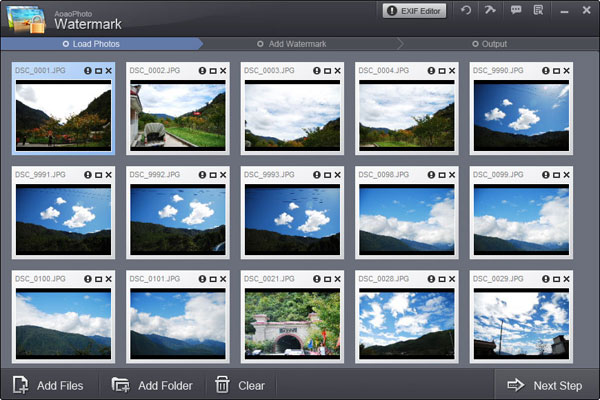
Step1: Add Photo to Photo Watermark Software
Open Aoao Watermark Software, choose images which you want to watermark and click "Next Step" to its editing window.
Step2: Create A Photo Watermark
Click "Image" tab at the top to start editing image watermark.
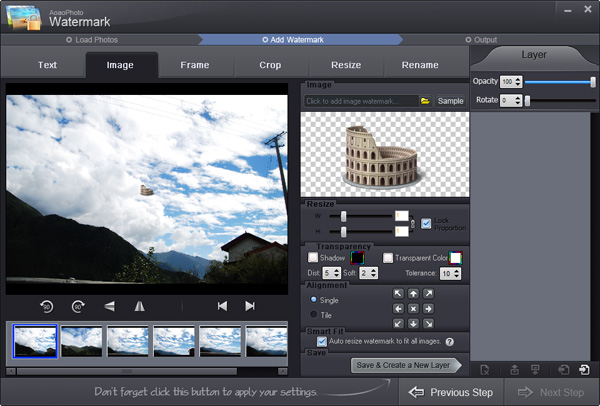
On its image watermark panel, you can select an existing image watermark from material library or click "Browse" button to load a new one from your disk.

Step3: More Watermark Settings
After loaded image watermark, you will see the watermark on preview window. Here you can do more settings on it, such as resizing, changing its value of opacity and rotation. Specify watermark modes: Single/Title. You can also drag watermark directly to position it over photos. After all is OK, click “Save & Create a New Layer” and then click “Next Step”, its output setting interface will pop up.
Step4: Start Processing
On its output setting panel, choose output image format and output folder. Click "Run" to start watermarking photos. All the photos will be process quickly with good quality.
See it here.

The Limitation of Free Trial
1. The unregistered version of Aoao Watermark will put "DEMO" watermark on output photos.
2. No expiration.
3. No functional limitation.
Contact Us | License | Privacy | Sitemap
Copyright © 2009-2024 AoaoPhoto Digital Studio. All rights reserved.