
Photoshop Alternative
Add text or signatre to picture
How to Put Text to GIF
Put Text on Photos
Add Words to Animated GIFs
How to Add Text to Video
How to Add Words to Image
How to Batch Resize Photo
How to Add Logo to Video in Batch
How to Add Image to GIF
How to make a watermark
How to remove watermark
Remove watermark with cover new
Add text watermark to photos
Add image watermark to photos
Add photo watermark to images
Batch watermark your photos
How to add frames to photos
How to crop pictures
How to resize pictures
How to batch rename files
Create a watermark template
Load the watermark template
Add multi-watermarks to photos
How to convert image format
How to convert image to JPEG
How to convert image to GIF
Get Aoao Watermark
Overview
Getting Started
Details of Aoao Photo Watermark
Key Feature
Technical Support
Watermark Glossary
Sample
Screenshot


Get latest version of Aoao Watermark.
Aoao Watermark getting started
View Detail of Aoao Watermark
Did you have a digital camera?
Do you like editing digital photos?
Do you want to share your photos to website, blog, forum?
Did you worry your photos would be unauthorized used?
If yes. You need a photo watermark software to protect your photo copyright, so how to find photo watermark software.
An easy way is to visit the best software download web - download.com, because their editor review is authoritative, you can via review to evaluate software.
If without copyright, people would be free to use your artistic work such as your photo without payment, and there would be little financial compensation for the effort of creating great photos. With copyright, you will have legal protection.
If someone wants to use (copy) your photos, they have to get your permission. You can negotiate a "license" to copy, and perhaps even get paid in real money. While there are lots of ways to protect your photo’ copyright, photo watermark software is probably the most effective one. Great photo watermark software could help you protect your photo copyright very well.
Choose proper photo watermark software is very important. If I need choose, I will consider the elements below:
1, The photo watermark software must protect your photo copyright
Can add text watermark and image watermark to your digital photos, satisfy your basic requirements.
2, The photo watermark software must be Easy-to-use
Easy-to-use interface could bring a nice process. And it also can save much time.
3, Support all of popular photo formats
Should support all of popular photo formats, you can convert any photo format easily, to adapt to a variety of purposes.
4, Save your money
The photo watermark software must have a cheap price.
Aoao Watermark Software 4.5 star rated by CNet editor, it's a professional photo watermark software for pictures protection, Aoao Watermark could add digital watermark(text, image, logo...) to your pictures,
Click here to free download Aoao Watermark Software.

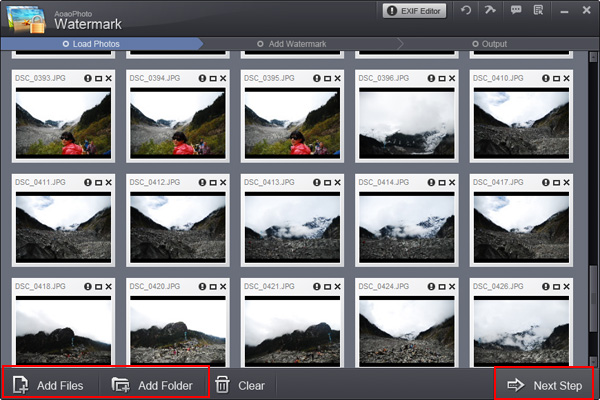
Step1: Add image.
Launch Aoao watermark software, choose the picture which you want to add watermark and click "Next" to edit window,. then, click "add image" to image edit page.
Step2: Create a photo watermark
Go to "Add Image" page to create an image watermark to your digital photos.
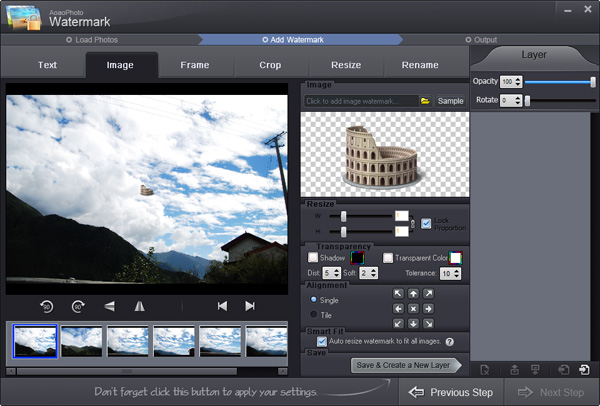
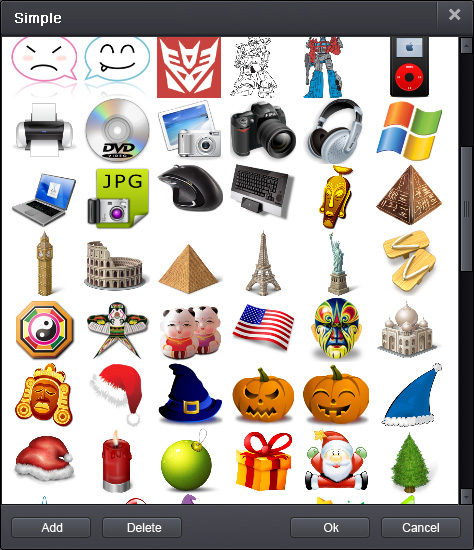
You can select a existing watermark or click "Browse" to load a photo watermark from your disk.
Step3: Watermark settings
1) Photo watermark thumbnail.
2) Inverse proportion setting, you can set watermarks' width, high with separate or lock.
3) Adjust opacity and rotate of the watermark.
4) Two watermark modes,
General = place
a watermarking on digital photos.
Tile = A power watermarking mode.
5) Watermark alignment.
6) Activat the box, photo watermark will be auto resize to fit your photo size; disabled the box, all watermarks will be same size.
7) Add a new watermark layer.
8) Delete
current watermark layer.
Step4: Save.
Click "Run" to apply your settings to digital photos.
See it here.

The Limitation of Free Trial
1. The unregistered version of Aoao Watermark will put "DEMO" watermark on output photos.
2. No expiration.
3. No functional limitation.
Contact Us | License | Privacy | Sitemap
Copyright © 2009-2024 AoaoPhoto Digital Studio. All rights reserved.