




Add text to a picture
Create watermark
Image watermark
Photo frame
Watermark images
Watermark photos
Add copyright to photo
How to copyright photos
Text watermark
How to Add Logo to Photo
Overview
Getting Started
Details of Aoao Photo Watermark
How to Use Aoao Watermark
Technical Support
Watermark Glossary
Sample
Screenshot
Choose photo watermark software
How to make a watermark
How to remove watermark
Remove watermark with cover new
Add text watermark to photos
Add image watermark to photos
Add photo watermark to images
Batch watermark your photos
How to add frames to photos
How to crop pictures
How to resize pictures
How to batch rename files
Create a watermark template
Load the watermark template
Add multi-watermarks to photos
How to convert image format
How to convert image to JPEG
How to convert image to GIF
Get Aoao Watermark


Get latest version of Aoao Watermark.
Aoao Watermark getting started
View Detail of Aoao Watermark
If you upload or share your pictures on the web a lot, have you ever thought of what will happen to them? Others always have the chance to copy and download your picture and republish it without giving your credit or re-edit your image in a way you never want. So it’s time to copyright your pictures if you do care your image works. Adding watermark to picture is fairly effective way to prevent your online pictures from unauthorized copying and using.
The original definition of watermark is recognizable image or pattern in paper that appears as various shades of lightness or darkness when viewed by transmitted light, caused by thickness or density variations in the paper. But here watermark we mentioned is visible word or image in picture, which must be digital picture. Picture watermark is commonly used for online picture copyright protection. The watermark can include text, signature, copyright symbols, individual seal, company logo and even animated GIF icon. Every viewer will see your copyright info after you added watermark to your pictures and it’s hard to remove watermark from your picture.

Maybe you have struggled to find a better way to show yourself or your company. Maybe you would like to let everyone know your artwork. Maybe you want to watermark your photographs before upload them to sharing websites.
Watermarking pictures you want to share online is an easy way to show yourself, which will let every visitor learn more about its original author. Moreover, watermark can prevent your online pictures from unauthorized using.
Firstly you need photo software like Adobe Photoshop, but here I recommend another easy and cheap photo watermark software - Aoao Watermark.
It is simple and fast photo watermark program provide professional picture protection solutions for your online pictures, the batch mode let you add watermark to 100 pictures within 1 minute. Click below button to download Aoao Watermark and install to your PC.

Step 1 Launch Program
Click to download Aoao Watermark Software, and then launch it. Choose the image you want to add watermark, click "Next" to go to editing interface.
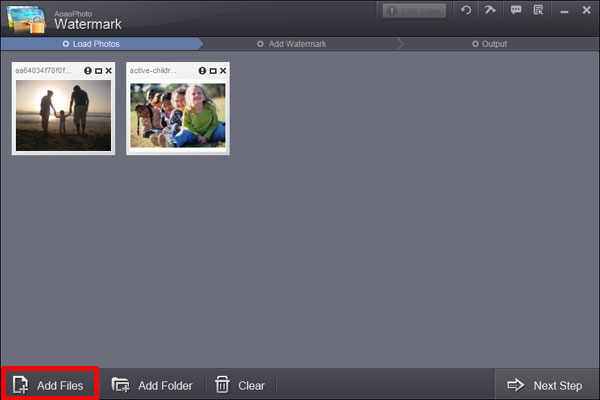
Step 2 Add Text Watermark
(2-1)Input text in blank box at the upper right of interface.
(2-2)Then you can modify more about font size, character style, color, etc by clicking “Text Setting”.
(2-3)Adjust value of “Opacity” and “Rotate”. Adjust “Alignment” - position of watermark over the photo. You can also drag text watermark in preview window to change its position. Specify “Single/Title”. Click “Apply” to apply what you made and you can go to step 3.

Step 3 Batch Watermarking Your Images
(3-1)Hit “Next” button, you will come to export interface.
(3-2)Specify output folder and output format.
(3-3)Click “Run” to start processing watermark.


The Limitation of Free Trial
1. The unregistered version of Aoao Watermark will put "DEMO" watermark on output photos.
2. No expiration.
3. No functional limitation.
Contact Us | License | Privacy | Sitemap
Copyright © 2009-2024 AoaoPhoto Digital Studio. All rights reserved.