
AVI to BMP converter
AVI to image
DVD to JPG, JPEG
MPEG to JPEG Converter
Video to image converter
Video to photo converter
Video to picture software
AVI to PNG
AVI to JPEG converter
Capture Picture From Video
Overview
Getting Started
Detail of Video to Picture Converter
How to Use Video to Picture
Screenshot
Check Support Formats

Get latest version of Video to Picture Converter.
Video to Picture Converter getting started
View Detail of Video to Picture Converter
It’s a trend to download funny videos or favorite movie clips from YouTube, Vimeo, Facebook or other video-sharing sites nowadays for playback on portable devices. You might also have downloaded a couple of videos for certain amazing part within these videos. Perhaps it’s the massive visual impact to your eyes, or a scene touching you a lot so that you want to convert it to seriate pictures or even animated GIFs and share with your friends. There could have millions of reasons why you need to capture images from video or even get animated GIFs from video clips. But the problem is how to complete this task easily and quickly. Here you can turn to a professional video capture image tool – Aoao Video to Picture Converter, which is a handy and fun program to help convert all popular videos to seriate images or GIF animation.
A real simple solution for convert a video to seriate pictures. In addition, you can also be flexible to control the number of pictures for each frame.
1. Aoao Video to Picture Converter provides the easiest-to-use and fastest way to convert all key movie file/video formats (including AVI, MPG, WMV, MKV, MOV, MP4, 3GP, etc.) to any picture format (like JPG, GIF, BMP, TGA, TIF, PCX, ICO, etc.).
2. It allows you have precisely control frame rate setting and fine tune each frame to accurate the part you want for output.
3. Basic editing functions (resize, special effect and more) have been provided to enhance the quality.
4. ZERO quality loss & ZERO frame rate loss.
(Notice: This is a shareware, free trial without functional limitations, but the unregistered version will put words "Unregistered Version" on processed image. The list price is $29.90, now limited discount price is $19.90 few days, please seize the chance to purchase >> )

Now let’s have a quick look at how to capture pictures from video with this remarkable tool recommended.
Follow the three simple steps below.
Launch the program and then Click “Open” to input the video that you want to capture image from.
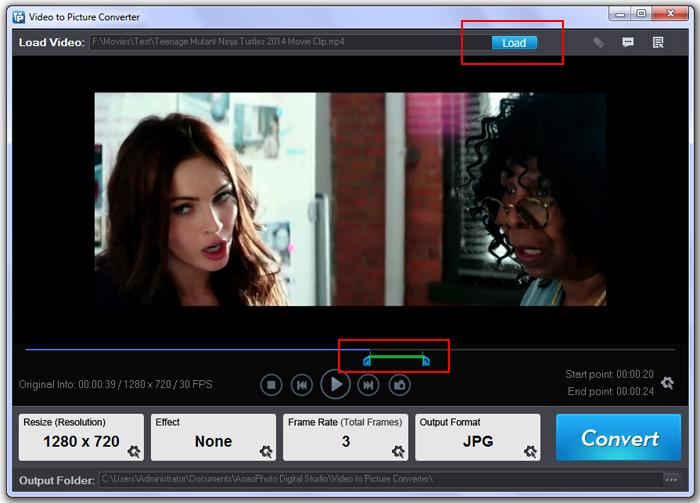
Note: After you add the video, you’ll see more detailed information about it, such as the video resolution, total frames, frame rate, aspect ratio and more, which may be useful to you.
Here, we can do more customized settings.
Drag the timeline slide bar under the preview window: set the starting time and ending time to define the part that you’d like to capture. (It’s cool to fine tune each frame by hitting “Previous Frame” and “Next Frame”.)
Specify the option “Serial Pictures”/ “Animated GIF”. And then set the output frame rate as you like.
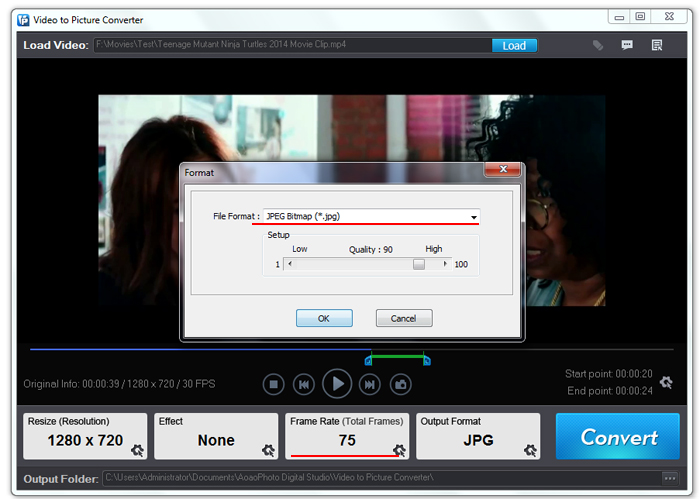
Optional: Resize Output image by changing its width and height. Add special effects like Invert, Sharpen, Brighten, Red, Black and White, etc to touch up the images.
Click “Run” to jump to Output Setting Interface. Here you can set output folder and format.
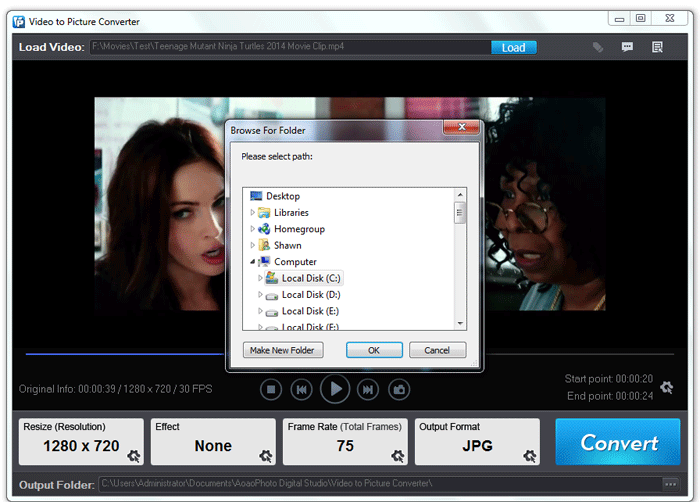
With just a few clicks, the task of capturing seriate images from video can be accomplished better than ever.
The Limitation of Free Trial
1. The unregistered version of Video to Picture Converter will put words "Unregistered verion" on output picture.
2. No expiration.
3. No functional limitation.
Contact Us | License | Privacy | Sitemap
Copyright © 2009-2024 AoaoPhoto Digital Studio. All rights reserved.