
AVI to BMP converter
Capture Image From Video
DVD to JPG, JPEG
MPEG to JPEG Converter
Video to image converter
Video to photo converter
Video to picture software
AVI to PNG
AVI to JPEG converter
Capture Picture From Video
Overview
Getting Started
Detail of Video to Picture Converter
How to Use Video to Picture
Screenshot
Check Support Formats

Get latest version of Video to Picture Converter.
Video to Picture Converter getting started
View Detail of Video to Picture Converter
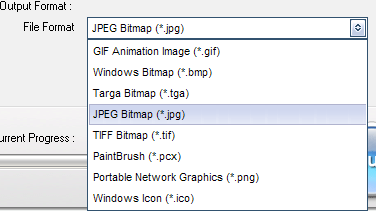
Video to picture converter is an easy to use conversion software that support convert avi to image. you can capture a single image or seriate images from avi file. It also support convert popular formats of video to images. If you want to convert avi to image, please download this software to evaluate, just 3 steps to complete avi to image progress.
If you never used the Video to Picture Converter please download it first, free trial without any functional limitations and timeout, but the unregistered version will put words "Unregistered Version" on output file, the license price is $19.90 (30-day money back guarantee). Buy it Now >
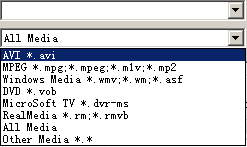
Step1: Launch the software click  . select a video format to input (select AVI format here)
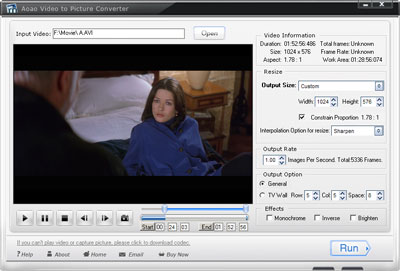
After your input, you can play your video, like a player (Play, Pause, Stop, Backward, Forward), and you can click to  capturing a still image.
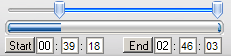
Step2: Drag the bar to control the length of time for output frame, you can see also playing progress here. Type a numerical value for time and click "Start" and "End" button to apply.
Step3: Choose a existing size or type a new size for output.
Or

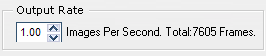
Step4: Type a frame rate, the frame rate can control "How many images per second" or "How many times per image"
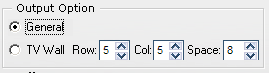
Step5: Select a output option, General is convert avi to seriate png image. TV Wall is convert avi to a TV Wall image(more pictures in one).
If you like, you can add some effects to your output images.
Step6: Click "Run" button to convert avi to image.
The Limitation of Free Trial
1. The unregistered version of Video to Picture Converter will put words "Unregistered verion" on output picture.
2. No expiration.
3. No functional limitation.
Contact Us | License | Privacy | Sitemap
Copyright © 2009-2024 AoaoPhoto Digital Studio. All rights reserved.