
AVI to image
Capture Image From Video
DVD to JPG, JPEG
MPEG to JPEG Converter
Video to image converter
Video to photo converter
Video to picture software
AVI to PNG
AVI to JPEG converter
Capture Picture From Video
Overview
Getting Started
Detail of Video to Picture Converter
How to Use Video to Picture
Screenshot
Check Support Formats

Get latest version of Video to Picture Converter.
Video to Picture Converter getting started
View Detail of Video to Picture Converter
AVI (Audio Video Interleave), a multimedia container format. It contains both audio and video data in a file container that allows synchronous audio-with-video playback, and support multiple streaming audio and video.
The BMP File Format, is BMP, a commonly used graphics format for storing bitmap digital images, independently of the display device (such as a graphics adapter), especially on Microsoft Windows and OS/2 operating systems. The BMP format stores color data for each pixel in the image without any compression.
Here we list two common ways to convert AVI to BMP
1. Play the AVI video with a video player and click "Print Screen" of keyboard then paste (Ctrl+V) the screenshot to windows paint, then save it to BMP image format.
2. Or Use a video player which supports snapshot function to capture a single BMP image each time.
The two ways above, sadly, can’t convert AVI videos to seriate BMP images. To solve this problem, you need a professional AVI to BMP converter.
Here we recommend Aoao Video to Picture Converter, it can convert AVI video to BMP without any quality loss.

1. Apart from converting AVI file to BMP, you are also able to convert any other video formats to image formats like JPEG, PNG, GIF, etc,
2. Fast speed and good quality is necessary, and this tool must convert video to picture with ZERO quality loss. Who wants to get a fuzzy picture?
3. Easy-to-use interface, letting beginners handle as fast as possible.
4. Safe and Support Extra Features. The converting tool won't do any harm to PC with any viruses or spyware. Moreover, it must be more powerful with extra functions like resizing or applying special effects, which enable users to enjoy more.
Aoao Video to Picture Converter is what you really need. Its interface is intuitive and everyone can handle it well. And it supports nearly all video formats including AVI, MPG, WMV, MKV, MOV, MP4, 3GP, etc to BMP, JPG, TGA, GIF, TIF, PCX and more without losing quality. Besides, you can fine-tune each frame.
Before that, make sure you have already downloaded Aoao Video to Picture Converter, if not, click here to download.
Run the software, click “Open” to upload your video.

Tips: Detailed information of video is presented in the right part, you can take full advantage of the information.
Drag the time-line bar to choose the part you want to convert, or you can set the parameters of the starting time and ending time accurately;
Set the output rate (how many pictures per second);
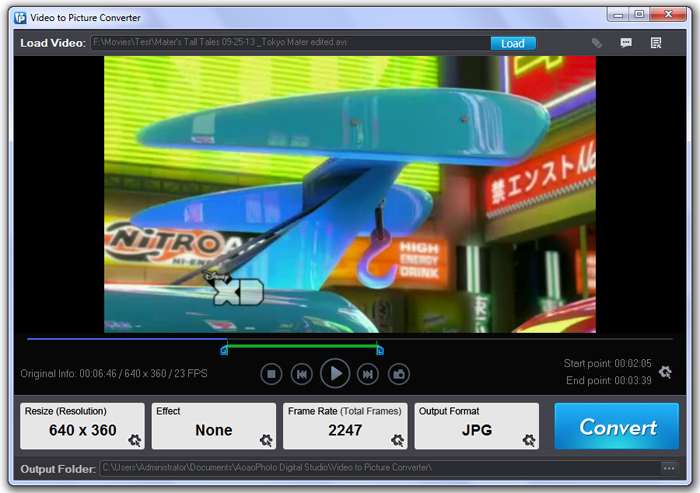
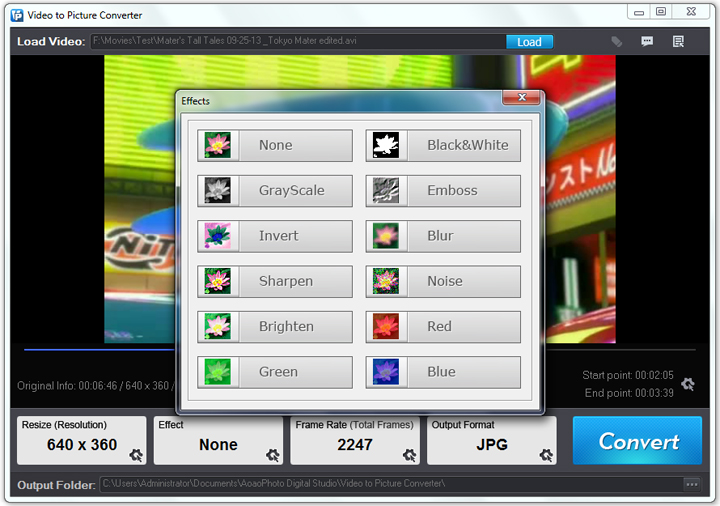
Add some special effects like Black and White, Blur, Brighten, Red, etc to the video to make it more remarkable. (Optional)
Click “Run” to enter output folder interface, choose the output folder and output format;
Click “Run” to complete process.
Still have trouble about converting AVI to BMP? Please feel free to Email Us >>
Video GIF Maker - Convert Video to GIF Easily with the GIF Maker from Video
Wanna find a way to make gif from video? Video GIF Maker is simple GIF making software for every user. You can get animated GIF as you want from video in the fastest and effective way.
The Limitation of Free Trial
1. The unregistered version of Video to Picture Converter will put words "Unregistered verion" on output picture.
2. No expiration.
3. No functional limitation.
Contact Us | License | Privacy | Sitemap
Copyright © 2009-2024 AoaoPhoto Digital Studio. All rights reserved.