
AVI to animated gif
AVI to gif
AVI to gif converter
AVI video to gif
Free avi to gif freeware
Movie to gif converter
MPEG to gif converter
Turn video into picture
Video to gif converter
Video to animated gif
How to convert avi to gif
How to convert movie to gif
How to convert mpeg to gif
How to convert video to gif
How to make a gif from a video
How to make a photo video
How to make a picture video
How to make gif from video
How to make video into gif
Overview
Getting Started
Detail of Video to GIF Converter
How to Use Video to GIF Converter
Screenshot
Check Support Formats

Get latest version of Video to Picture Converter.
Video to GIF Converter getting started
View Detail of Video to GIF Converter
The questions on how to make a GIF from video are full of the web. Did you find the best solution? If no, I think this article will be very helpful. After reading, you won’t need to waste much time on this annoying question.
Why people prefer to make GIF from video? Some may want to put GIF on website to save space, some may only want keep some wonderful segments of a video. What’s your preference?
Look for a way to make gif from video? Aoao Video to GIF converter can do it well, let you play video in GIF file.

Let’s return. Today I want to share one of the best ways to get animated GIF from video. All you need is a professional and easy-to-navigate tiny tool. Some may argue that the online tool is enough. However, its Achilles' heel is the security, especially when you put some private video online, not to mention it only supports converting a whole video. Don't hesitate to try a professional video GIF maker to customize your GIF.

I have used may related video GIF maker software including those free ones. Free software attract eyes indeed, but the output quality is not so good, or the output size is too large compared with the original. Thus, I highly recommend you a more professional program.
Aoao Video to GIF Converter - a GIF maker from video, helps you easily convert a video of any format like AVI, MPEG, MPV, MP4, VOB, FLV, MOV, etc to GIF as well as seriate pictures. With it, you are able to have precise control over frame rate by dragging the time-line bar. Besides, adding special effects and video-to-photo resizing are also available.
Before adding the video, make sure you’ve downloaded and installed the program on your PC successfully. Now let’s open the program.
Click “Load Video” to input the video you want to convert. You’ll see the friendly main interface as the image below.

Note: After adding your video, you are allowed to preview it as well as able to capture a single picture from it by pressing the “Camera” button.
Drag the time-line bar to set the starting and ending time of the GIF images, select the frame rates of the GIF images.
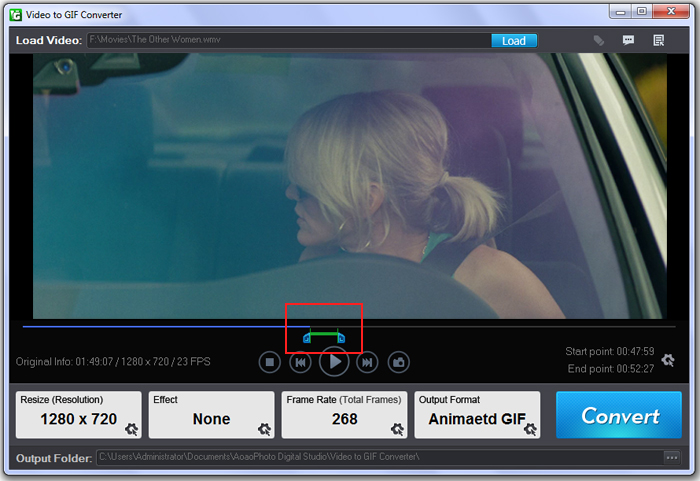
Resize the output image if needed. (Optional)
Apply special effects like Black and White, Invert, Sharpen, Brighten, Red, etc to touch up the output file. (Optional)
Click “Next” to the last step.
This tiny tool lets you preview the output GIF image. And you are allowed to change your setting at this step.
Choose an output folder for better organization.
Set the GIF output quality. Its default quality is Best Quality (Slowest).You can also have other choice according to your requirement including Windows 256 Colors, Netscape 216 Colors and more.
At last, hit “Run”.
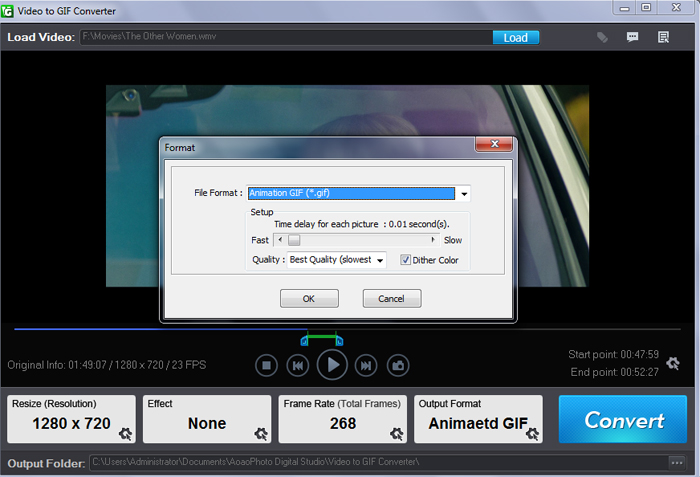
When the task is finished well in very short time, you can open the output folder to check the animated GIF file.

The Limitation of Free Trial
1. The unregistered version of Video to GIF Converter will put words "Unregistered verion" on output picture.
2. No expiration.
3. No functional limitation.
Contact Us | License | Privacy | Sitemap
Copyright © 2009-2024 AoaoPhoto Digital Studio. All rights reserved.