
AVI to gif
AVI to gif converter
AVI video to gif
Free avi to gif freeware
Movie to gif converter
MPEG to gif converter
Turn video into picture
Video to gif converter
Video to gif maker
Video to animated gif
How to convert avi to gif
How to convert movie to gif
How to convert mpeg to gif
How to convert video to gif
How to make a gif from a video
How to make a photo video
How to make a picture video
How to make gif from video
How to make video into gif
Overview
Getting Started
Detail of Video to GIF Converter
How to Use Video to GIF Converter
Screenshot
Check Support Formats

Get latest version of Video to Picture Converter.
Video to GIF Converter getting started
View Detail of Video to GIF Converter
Here starts with a question, why we need to convert AVI video to an animated GIF? Perhaps you have your favorite movies and want to save some parts as GIF animation for putting on your blog. Or maybe you just need an easier way to make your AVI file to GIF to make your friends belly laugh. You’ll find a lot of reasons. But the result may be the same.
Absolutely, converting AVI to animated GIF is not an easy thing as we think due to limitations of different files. The basic solution is to get image frames in video first and combine those frames you need to generate an animated GIF. But it’s too troublesome and time-consuming. So if you want to create fabulous GIF animation from your favorite video/movie, it’s necessary for you to find a handy video to GIF converter to get some professional help. Aoao Video to Animated GIF Converter is just the right tool worth a try. It’s quickly and easily and unlike those online GIF makers, the output GIF quality is as good as original. Meanwhile there is no limit to video size. Whether you’re the most novice user or experienced one, keep reading the detailed tutorial of how to convert AVI to animated GIF.

Aoao Video to Animated GIF Converter is an easy-to-use Windows program with outstanding features:
1. Supporting most kinds of import/output formats. Import formats includes AVI, MPG, MKV, MOV, 3GP, etc, output formats includes animation GIF, JPEG, BMP, PNG, TGA, etc.
2. ZERO-QUALITY loss
3. Simple process. All you need is to select starting point and ending point in video and choose image formats for output.
4. Supporting customize your output files like resizing, adding special effects.
If you never used Aoao Video to GIF Converter, please click here to download it first. And then install it on your computer.
Step1: Load Source Video to Program
Launch Aoao Video to GIF Converter, click "Load Video" button to load your movie/video file. This program supports inputting all popular video formats, like AVI, MP4, MPG, WMV, MOV, etc.

Note: In its preview window, you can play, pause, stop, backward, forward, click the "Camera" icon to capture a still image.
Note: You’re able to preview the video and capture still image from it by hitting the “Camera” button.
Step2: Select the Part for Output
You can drag slide bar to set its start time and end time or manually type start time and end time, click "Start" and "End" button to apply. Specify “Animated GIF” as output option. After that, you can also edit more on output files. Here you can adjust its output size and frame rate.
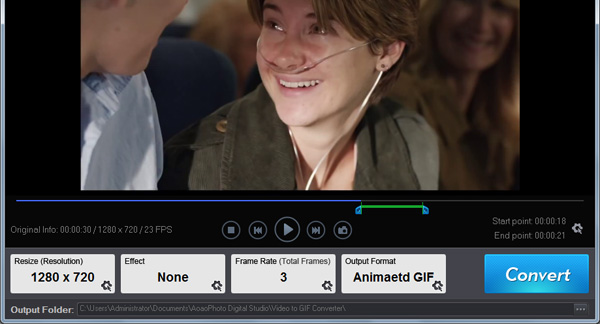
Step3: Start Conversion
On its Output Interface, select output folder for output. Click "Run" button to start the whole task.
The Limitation of Free Trial
1. The unregistered version of Video to GIF Converter will put words "Unregistered verion" on output picture.
2. No expiration.
3. No functional limitation.
Contact Us | License | Privacy | Sitemap
Copyright © 2009-2024 AoaoPhoto Digital Studio. All rights reserved.