SWF to GIF with excellent quality
Convert swf to gif
Flash swf to gif
SWF to gif converter
SWF to image
SWF to png
Our User Says:
“Is there any tool that allows me to convert SWF to JPEG with precise resolution? And I need to create big JPG image to print. ” - Georgia
Get latest version of SWF to Picture Converter.
SWF to Picture Converter getting started
View Detail of SWF to Picture Converter
SWF(shock wave flash) is an Adobe Flash file format used for multimedia, vector graphics and ActionScript. Originating with FutureWave Software, then transferred to Macromedia, and then coming under the control of Adobe, SWF files can contain animations or applets of varying degrees of interactivity and function.
JPG(also called JPEG) is a very popular image format for storing digital images. It has good compatibility and is supported by many famous photo sharing websites including Pinterest, Flickr, Fotki, etc. So if you happen to have some good SWF files and are still looking for ways to capture every frame of an SWF as JPG, you come to the right place. After you read the useful tips below, you can easily save SWF file in JPG format without losing quality and post it on pop forums, your blog, twitter and Facebook.
The SWF to JPEG (*.JPG) Converter enables you to convert SWF to seriate pictures in JPEG/JPG format. With leading technology, it can convert SWF to JPG with 0 quality loss. Besides, the SWF to JPEG converter is able to convert SWF to animated GIF, BMP, TGA, TIF, PNG, PCX and more. Meanwhile, with it, you are also capable of making effects like Black and White, Emboss, Sharpen, Brighten, etc during the conversion process.

Now, let’s start and see what an excellent work the SWF to JPEG Converter can do for you.
Before we start, you need to make sure you’ve downloaded and installed Aoao SWF to GIF Converter on your computer successfully.
Launch the program and you’ll see an intuitive user interface
Then click “Open” to import the SWF file you want to convert.
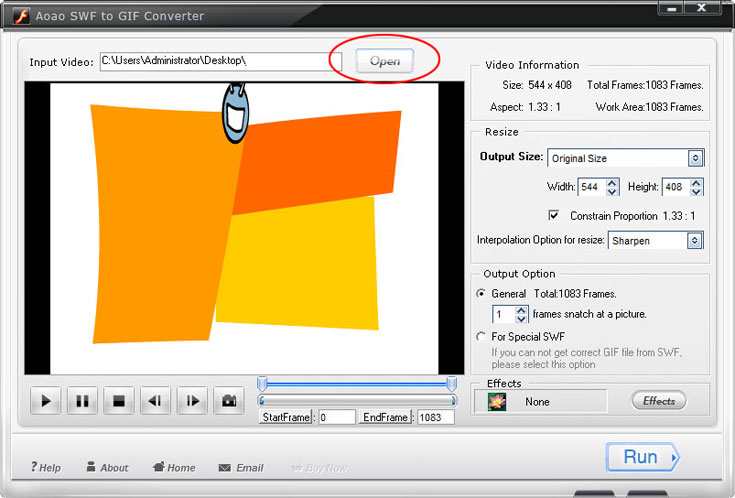
Note: After you input the SWF file, you are able to see its detailed information, such as the file resolution, total frames and aspect.
Set the part of the SWF to be converted by dragging the time-line bar under the preview window. In this way, you can save time and space to only preserve the part you need.
Resize output JPEG image by changing the width and height. (Optional)
Apply special effects to touch up the images. (Optional)
Click “Run” to the final easy step.

Note: You are supported to type an exact number in the “StartFrame” and “EndFrame” blanks. Moreover, Aoao SWF to GIF Converter lets you capture a single image from SWF file.
Choose an output folder for better organization.
Select JPEG as output image format and now click “Run” to start the conversion process.
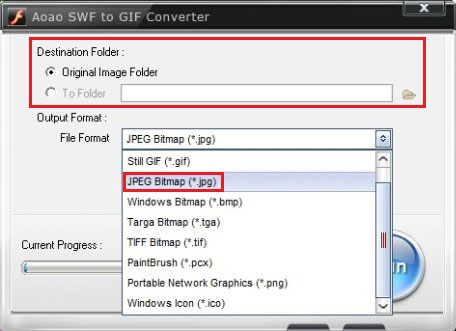
The whole task will be accomplished in the shortest time. And you’ll be very satisfied with its performance.
The Limitation of Free Trial
1. The unregistered version of SWF to GIF Converter will put words "Unregistered verion" on output picture.
2. No expiration.
3. No functional limitation.
Contact Us | License | Privacy | Sitemap
Copyright © 2009-2024 AoaoPhoto Digital Studio. All rights reserved.