
SWF to GIF with excellent quality
Convert swf to gif
Flash swf to gif
SWF to gif converter
SWF to jpeg
SWF to png
Get latest version of SWF to Picture Converter.
SWF to Picture Converter getting started
View Detail of SWF to Picture Converter
If you are never used Aoao SWF to GIF Converter, please download it at: https://www.aoaophoto.com/products/swf-to-gif.exe. This is shareware list price $29.90, now time limited discount price is $19.90, please seize the chance to purchase full version. Unregistered version will put words "Unregistered version" on output image.
Let us to start convert swf to animated gif.
Step 1: Launch Aoao SWF to GIF Converter, add you swf file by clicking "Open" button.
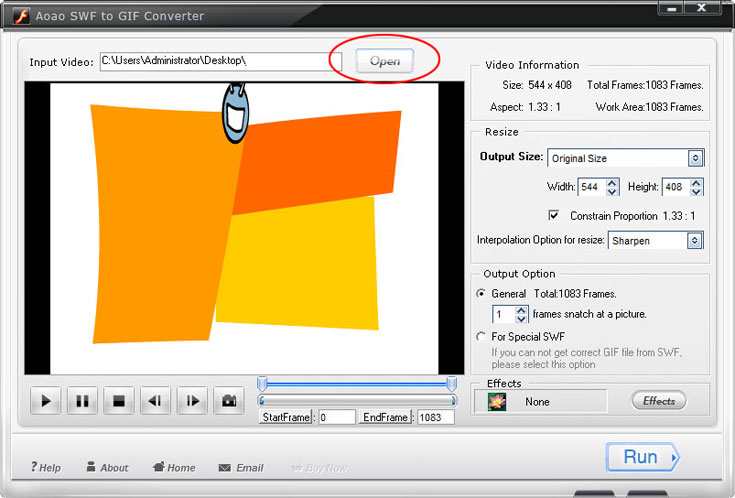
Step 2: With the swf preview window, you can do some actions like Play, Pause, Stop, previous frame, next frame and capture picture.

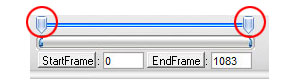
Step 3: Select part of swf which you want to converting to animated gif.
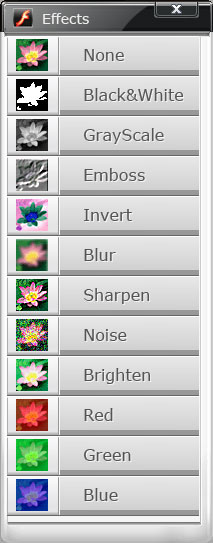
Step 4: Specially good effect available during the swf to gif converting process.
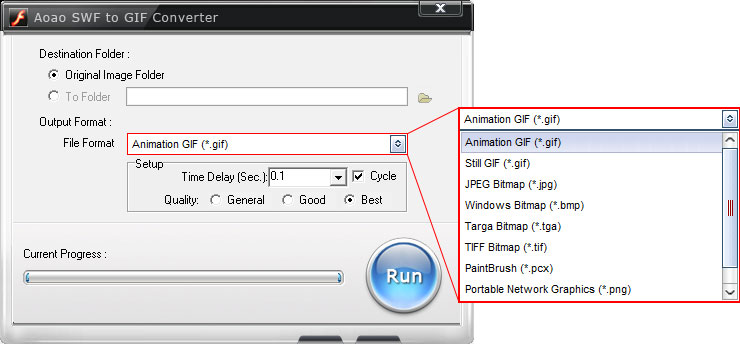
Step 5: Some necessary option on the output interface.
a. Choose a output folder.
b. Choose a output image format.
c. Output image quality setting.
After these parameters has been completed, click "Run" button to start conversion process. This process will take tens of seconds.
The Limitation of Free Trial
1. The unregistered version of SWF to GIF Converter will put words "Unregistered verion" on output picture.
2. No expiration.
3. No functional limitation.
Contact Us | License | Privacy | Sitemap
Copyright © 2009-2024 AoaoPhoto Digital Studio. All rights reserved.